

 Bitcoin
  Ethereum
  Solana
  TRON
TRON  Zcash
Zcash  Hyperliquid
  Dogecoin
  Monero
  Chainlink
  Cardano
  Stellar
  Uniswap
  Sui
Sui  Hedera
  Bittensor
  Shiba Inu
  Ripple USD
  Polkadot
  Aster
Aster  World Liberty Financial
  Render
  Artificial Superintelligence Alliance
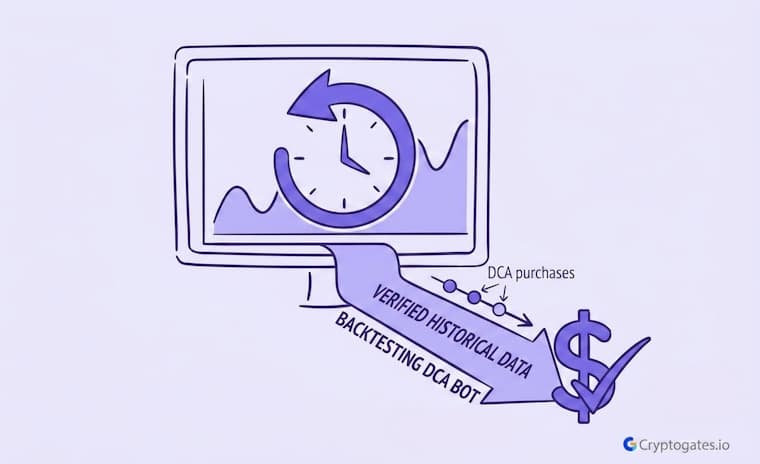
You set up your DCA bot, pick a coin, and trust it to do its job.
But here’s the catch. Most people pick their settings off pure guesswork.
A DCA Step % that just feels right.
A Take Profit % copied from some random forum post.
Then the market does something nobody planned for, and the bot keeps buying anyway.
A National University of Singapore backtest found a 40% chance of gaining 150%+ from crypto DCA within one year, rising to nearly 80% over two years.
(“CP3106: A Study of Cryptocurrency Investment with Dollar Cost Averaging,” Shanmu Wang)
That’s exactly why you backtest a DCA bot before it touches real capital.
CryptoGates lets you run that test on real historical price data, in minutes, before a single dollar moves.
- The Problem: Most DCA bots get launched on settings that were never actually tested against real price history.
- The Solution: CryptoGates' DCA Backtest Bot replays your exact parameters against historical OHLCV data before you commit any capital.
- The Incentive: You see realistic P&L, drawdown behavior, and fee impact in minutes instead of finding out the hard way over weeks of live trading.
- The Risk: A strong backtest only proves your settings worked for that one specific time window. It's not a promise for what comes next.
Why You Should Backtest a DCA Bot Before Going Live
Skipping this step is the single most common mistake beginners make.
They set their parameters off intuition, hit live mode, and find out the hard way that intuition isn’t a strategy.
To backtest a DCA bot properly means you’re trading hindsight for foresight, at zero cost.
What Happens When You Skip the Backtest
Here’s what usually plays out.
Someone picks a DCA Step % that “feels right,” runs it live, and the market does the one thing their gut didn’t account for.
Now they’re holding a position with no real reference point for whether the setup was ever sound.
This is exactly the gap a backtest closes.
Instead of finding out three weeks into a live trade, you find out in under a minute, using the same historical price action the market actually moved through.
What the CG DCA Backtest Bot Actually Does
Think of it as a rehearsal space.
You punch in the exact settings you’re planning to run live, like trading pair, order size, and step percentage, and the tool replays them against real price history instead of the future you’re hoping for.
No signup wall before you see results.
No fake demo data either.
Battle-Test Your Strategy
Before the Market Does.
Eliminate guesswork with institutional-grade backtesting for DCA, Grid, and Rebalance bots. Real historical data. Real-world results.
Why Backtest Before Running a Live DCA Bot
Honestly, most beginners skip this step entirely.
They copy a setup they saw online and go live the same day.
Attributed to John von Neumann, cited widely in quantitative finance literature on overfitting
Here’s the thing though: a setting that worked great during one type of market can fall apart completely in another.
A backtest shows you that gap before your capital does.
Step 1: Choose Your Trading Pair and Date Range
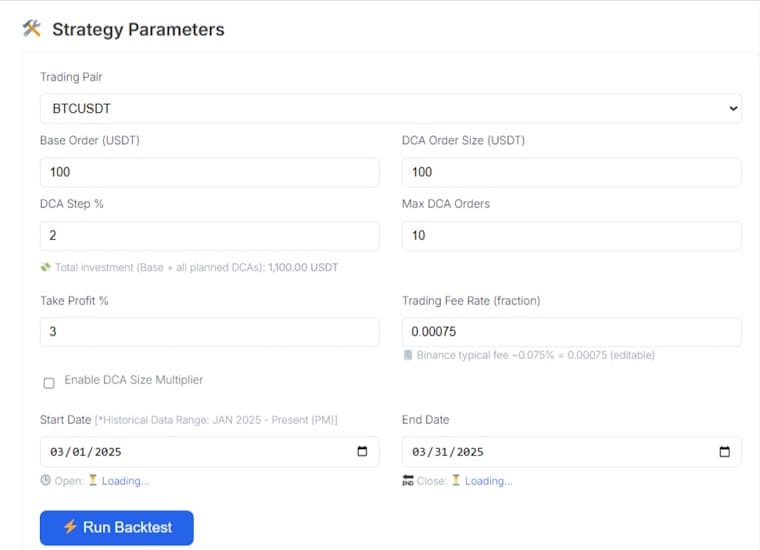 Open the DCA Backtest Bot and the first two fields are Trading Pair and the Start/End Date.
Pick the asset you actually plan to DCA into, then set a window long enough to mean something.
Picking a Realistic Test Window
A one-week test tells you almost nothing.
A multi-month window that crosses both a dip and a recovery tells you a lot more about how your settings actually behave.
Real Backtest Example
Strategy: DCA
Coin: TAO/USDT
Market Condition: Sharp pump followed by a prolonged bleed-back
Objective: Test whether a tight DCA step % can keep a bot profitable even when a coin gives back most of its gains
Key Result: In a real CryptoGates backtest, TAO surged 36% before round-tripping back to a 17% loss for anyone simply holding spot. Yet with a 1.5% DCA step tight enough to catch every leg down, 139 of 140 sessions still closed in profit, and the bot banked +$1,677.
Expert Interpretation: This case shows why “picking a realistic test window” matters more than picking a lucky one. A window that only captures the pump would have hidden how the strategy behaves once the trend reverses. Testing across the full pump-and-bleed cycle is what actually reveals whether a DCA Step % is tight enough to keep working once momentum fades.
A large crypto backtest covering thousands of simulations found that daily DCA execution lagged lump sum investing by just 1 to 3% during strong bull runs, while monthly DCA execution lagged by as much as 25 to 75% under the same conditions.
(Yellow, crypto research resource, as reported by The Crypto Basic)
Step 2: Set Base Order, DCA Order Size and DCA Step %
These three fields decide how aggressive your bot actually is.
Get them wrong and you’ll either run out of capital too early or barely average your entry price at all.

Use at least 2 to 3 months of data, and try to include both a dip and a recovery. A window that's all uptrend won't show you how the bot handles stress.
How DCA Step % Controls Your Entry Spacing
A tighter step %, say 1 to 2%, means the bot fires more often during smaller dips.
Widen it to 4 or 5% and it waits for bigger drops before adding.
Neither is automatically better.
It depends on how the asset actually moves, which is the whole point of running the test first.
Max DCA Orders, Setting a Capital Limit
This field caps your total exposure.
Set it too high without thinking it through, and one long downtrend can quietly eat through your entire budget before Take Profit ever triggers.
Wait, that’s not quite the full picture either.
It’s really about matching this number to how much capital you’re comfortable committing to one single trade idea.
| Parameter | What It Controls | Practical Tip |
|---|---|---|
| Base Order | Your first, immediate buy | Keep it modest relative to total budget |
| DCA Order Size | Size of each follow-up buy | Match it to Base Order unless testing a scaling approach |
| DCA Step % | Price gap that triggers next buy | Tighter % for low-volatility pairs, wider for high-volatility pairs |
| Max DCA Orders | Hard cap on total buys | Set this based on total capital, not hope |
Step 3: Set Take Profit % and Trading Fee Rate
Take Profit % sets your exit target, the gain at which the bot closes the position.
Trading Fee Rate matters just as much, maybe more, because it’s the field most beginners skim right past.
Yes. The Trading Fee Rate field gets built into every single calculation, not bolted on after the fact. Even a small percentage compounds once you're running multiple DCA orders.
Why Ignoring Fees Gives a False Result
Honestly, this is where a lot of backtests quietly lie to people.
A 3% Take Profit sounds clean on paper.
Run ten DCA orders through a fee on every entry and every exit, though, and that clean number gets chipped away fast.
Binance’s published spot trading fee schedule lists a standard taker fee of around 0.1%. Run that across ten round-trip DCA entries alone, and you’re already looking at roughly 2% in pure cost, before price movement even enters the picture.
(Binance Spot Trading Fee Schedule)
The tool defaults to a realistic fee figure instead of zero, which cheaper backtesting setups tend to skip entirely.
Step 4: Run the Backtest and Read the Output
Once your parameters are set, hit Run Backtest.
The tool processes the historical data and shows you P&L in USDT, measured against the Open and Close price for that exact window. Simple as that.
Using the Strategy A/B/C Comparison Table
Here’s what most beginners miss completely.
The tool auto-saves your last three test runs into a side-by-side comparison table, labeled A, B and C.
Change one variable, like the DCA Step %, rerun it, and now you’re looking at two versions of the same idea next to each other.

ZAHEER, CEO CryptoGates
What the Result Actually Tells You
A profitable backtest feels like proof. It isn’t, not entirely.
It only proves your logic survived one specific stretch of price history.
Different month, different coin, different volatility, and the same settings might behave completely differently.
Stop Guessing.
Stress Test Your Edge.
The market doesn't care about your backtest. Our engine simulates 1,000+ "what-if" scenarios to ensure your strategy is built for survival.
Run Crypto Strategy Engine →Cross-Checking Against CG Strategy Lab Examples
This is where the CG Strategy Lab playbooks earn their place.
Real runs like TAO through a pump-then-bleed cycle, ENA through a sharp crash, or TRX through a mild bearish stretch, all show the same DCA logic tested under different conditions.
Interactive Checklist
- Tested across at least one dip and one recovery, not just an uptrend
- Compared two or three parameter variations in the A/B/C table
- Fee Rate set to a realistic figure, not left at zero
- Max DCA Orders matched to actual available capital
- Result cross-checked against a CG Strategy Lab playbook on a similar asset
One good result means nothing.
The same logic holding up across several different market moods means a lot more.
Proven Setups &
Expert Breakdowns.
We don't just show you the data; we engineer and validate high-performance strategies, providing the "Alpha" behind the numbers.
Test the Setup Before You Trust It
One backtest run beats ten guesses, but one run still isn’t the finish line.
Adjust a variable, rerun it, compare it against your last attempt, and only then decide if the setup is actually worth running live.
That’s the entire point of the CG DCA Backtest Bot.
Not certainty, just less guessing.
Bailey & López de Prado, research on the probability of backtest overfitting
If you’re ready to move from theory to numbers, the DCA Backtest Bot is sitting right there on the platform, waiting for your settings instead of someone else’s.
FAQs
Can I backtest a DCA bot without creating an account?
Yes. The CG DCA Backtest Bot runs directly on the page, no signup needed before you see results.
What historical data does the DCA Backtest Bot use?
It uses 1-minute OHLCV data from Binance, covering January 2025 through the present.
Can I compare more than one DCA strategy at the same time?
Yes, the Strategy A/B/C Comparison table auto-saves your last three runs side by side.